
As we kick off Level 1, I want to take a moment to look at the “elephant in the room.” While we are going to master GitHub Actions for our personal projects because of its speed and modern feel, you cannot call yourself an Architect without understanding Jenkins.
If GitHub Actions is a sleek, modern electric car, Jenkins is the industrial diesel locomotive. It’s been around since 2004 (originally as Hudson), it’s built on Java, and it currently powers roughly 60% to 70% of the world’s enterprise pipelines.
When you walk into a boardroom or join a high-level technical discussion at a Fortune 500 company, they aren’t just talking about “scripts.” They are talking about Orchestration. Here is how you should visualize Jenkins in your mind.
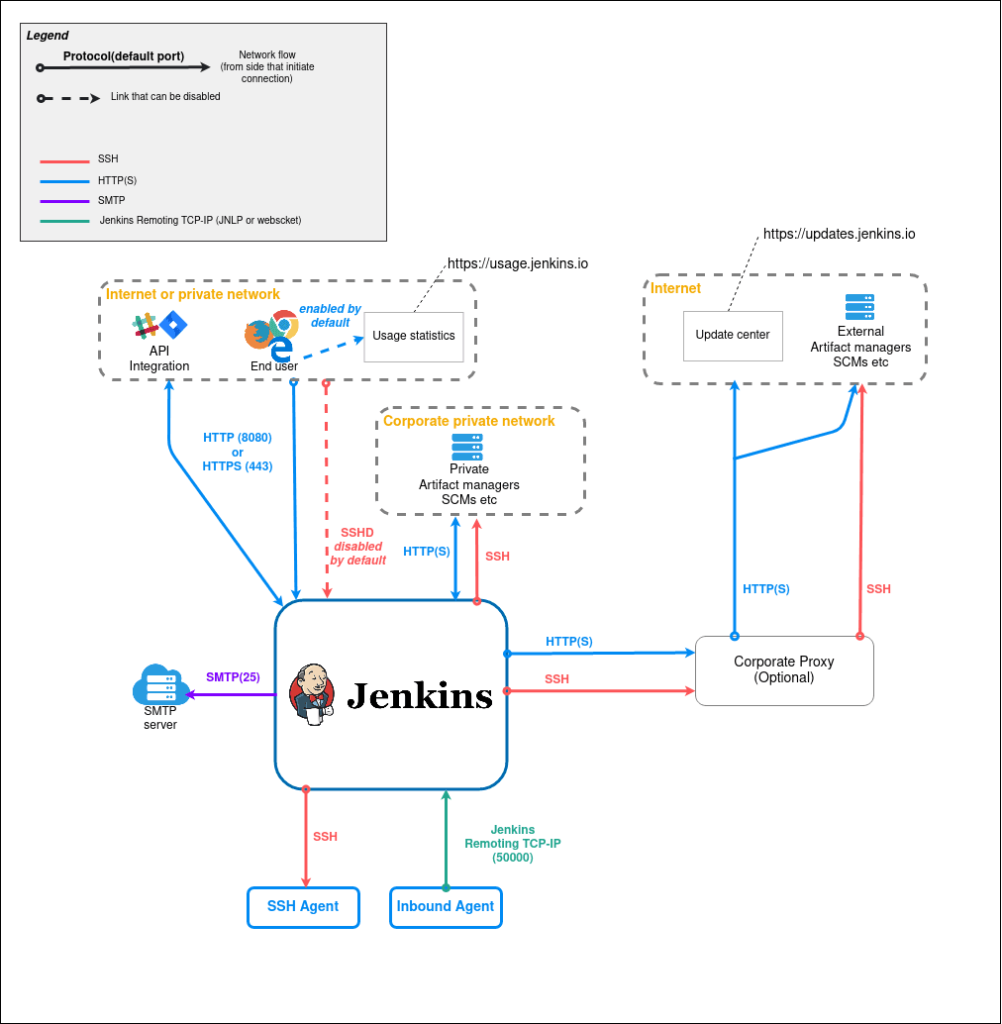
1. The Controller-Agent Architecture (The Brain and the Brawn)
In a proper enterprise, you never run a build on the main server. Jenkins uses a Controller-Agent model (formerly Master-Slave).
- The Controller (The Brain): This is the central hub. It handles the UI, manages the “Jenkinsfiles” (your pipeline code), schedules jobs, and monitors the health of the system.
- The Agents (The Brawn): These are separate machines (Virtual Machines, physical servers, or Docker containers). The Controller sends a task to an Agent, the Agent does the heavy lifting (compiling code, running tests), and then reports back.
Architect’s Tip: This separation is key for security and scalability. If one “Brawn” machine gets overwhelmed or hacked, the “Brain” stays safe and simply spins up another worker.
2. The “Plugin” Ecosystem (The Swiss Army Knife)
Jenkins’ greatest strength—and its biggest headache—is its 1,800+ plugins. It can talk to everything.
- Need to trigger a build from a legacy SVN repository? There’s a plugin.
- Need to deploy a COBOL application to a mainframe? There’s a plugin.
- Need to run a security scan through an obscure enterprise tool? There’s a plugin.
In a “Proper Organization,” you’ll see Jenkins acting as the Central Hub that connects modern AI tools with legacy databases that have been running since I started my career 25 years ago.
3. The Enterprise Gauntlet in Jenkins
When you visualize a Jenkins pipeline, don’t think of a single line. Think of a flowchart with gates.
- Parallel Execution: Jenkins can run 10 different test suites at the same time across 10 different agents.
- Manual Approvals: In an enterprise, you often hit a “Pause” button. A human (or an AI Senior Architect) must click “Approve” in the Jenkins UI before code is promoted from SIT to UAT.
- Shared Libraries: Big companies don’t write the same code twice. They use “Shared Libraries” (written in Groovy) so that every team in the building uses the exact same security and quality standards.
Why are we mastering GitHub Actions instead?
If Jenkins is so powerful, why aren’t we doing our tutorials there? Simple: Operational Overhead. To run Jenkins, you have to manage the server, patch the Java vulnerabilities, and deal with “Plugin Hell” (where updating one tool breaks three others). For our journey into AI, we want Speed. GitHub Actions gives us 90% of the power with 0% of the server maintenance.
The Architect’s Takeaway
When you are in a technical discussion and someone mentions “The Jenkins Build,” visualize a distributed network of worker nodes governed by a central controller, moving code through a complex web of SIT, QA, and PERF environments.
You don’t need to know every line of Groovy code to understand the value: Jenkins is about Total Control. It’s for when “convenience” isn’t enough, and you need a system that can be bent to the exact will of a 25-year veteran.
Next up: We start getting our hands dirty. I’ll be showing you how to build our first “Security Gatekeeper” using GitHub Actions—applying these same enterprise principles, but with modern speed.